DynePass

Password Manager

Your Secure Password Manager

Free & Ethical - Free Core Features, One-Time Premium

  • AES-256 Encrypted
  • Zero Data Collection
  • No Subscriptions

New: Fill your DynePass logins on your computer with DyneBridge →
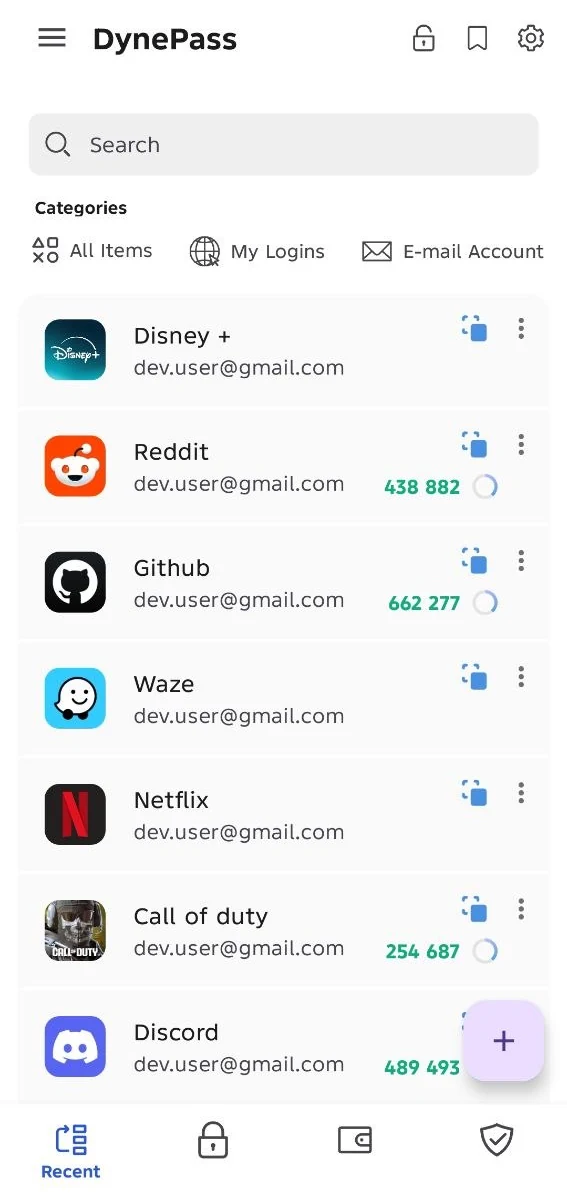
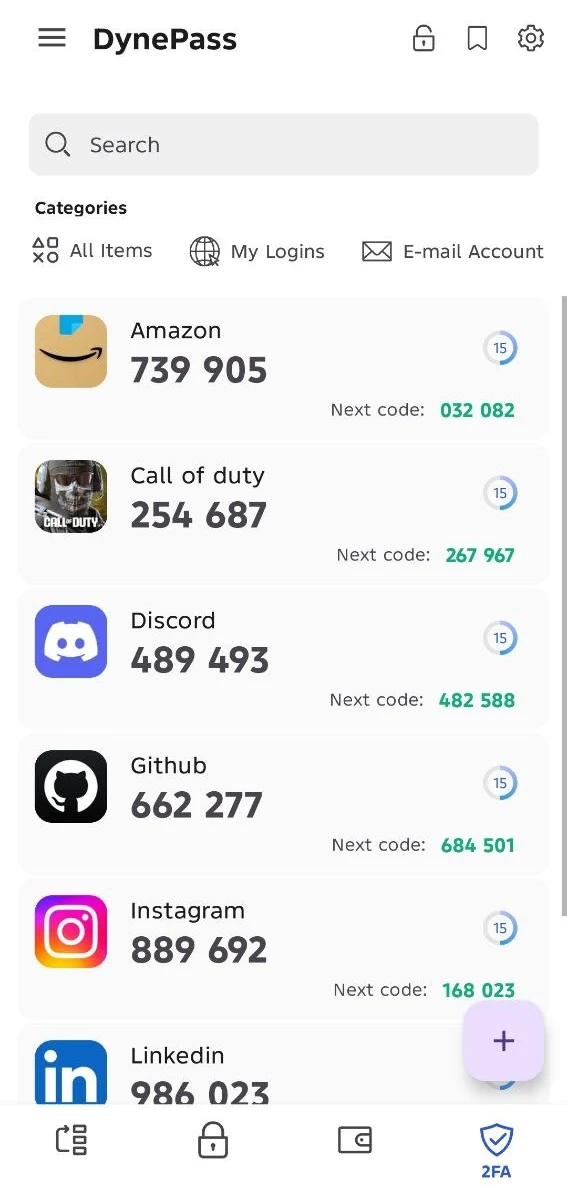
DynePass app showing a list of saved logins DynePass app showing 2FA codes with the next code
256-bit
AES Encryption
Zero
Data Collection
$9.99
One-Time Premium
100%
Privacy Focused

Why Choose DynePass?

Built with privacy, security, and user experience as top priorities

Privacy-First Design

Your passwords never leave your device unencrypted. We can't access your data even if we wanted to. No analytics, no tracking, no data mining.

Military-Grade Security

AES-256 encryption with Argon2id key derivation. Your master password protects everything with the same encryption used by governments and militaries.

Biometric Unlock

Quick and secure access with fingerprint or face unlock. Your biometric data never leaves your device and is handled entirely by Android's secure hardware.

Ethical Monetization

Core features are free. Premium is a one-time $9.99 purchase - no subscriptions, no recurring charges. Pay once, own forever.

Encrypted Backups

Create encrypted backups on your device and restore them when you need to. You can save or share a backup file with any app you choose, such as a cloud storage app. It can only be decrypted with your master password.

Lightning Fast

Built with performance in mind. Instant search and optimization for both modern flagships and older devices.

Use DynePass on Your Computer Too

DyneBridge sends your saved logins from the DynePass Android app into your browser over your own Wi-Fi, end-to-end encrypted. It has two parts, and you need both. DyneBridge is part of DynePass Premium.

1

Browser extension

Adds DyneBridge to your browser and fills in the login form.

Chrome · Firefox

2

DyneBridge Helper

A small app on the same computer that connects your phone to the extension. It only ever sees encrypted data.

Windows · Ubuntu · Fedora

Without the DyneBridge Helper, the extension can't reach your phone.

Free vs Premium

The essentials are free. Premium is a one-time purchase that unlocks 9 more features.

Free

$0

Included in Free and Premium

  • Encrypted data

    All your data is encrypted with AES-256 before being stored on device.

  • Biometric unlock

    Unlock the app instantly using your fingerprint or face recognition.

  • Backup & Restore

    Back up your entire vault and restore it at any time.

  • Export / Import

    Export and import your data in multiple formats for portability.

  • Auto lock

    Automatically lock the app after a configurable period of inactivity.

  • Password generator

    Generate strong, random passwords with customizable length and rules.

  • Autofill

    Auto-fill your credentials directly into any app or browser.

  • Unlimited entries

    Store as many passwords and entries as you need, no limits.

Premium

$9.99

One-time purchase. No subscriptions.

Everything in Free, plus:

  • DyneBridge

    Pair with the browser extension to bridge credentials over your local network.

  • Unlimited custom fields

    Add as many custom fields as you want to any entry.

  • Custom categories

    Create and manage your own categories to organise entries your way.

  • Image attachments

    Attach photos and files to your entries for extra context.

  • TOTP / 2FA Generator

    Generate time-based one-time passwords for two-factor authentication.

  • Card scanner OCR

    Scan credit card details automatically using your device camera.

  • Wi-Fi Direct sync

    Sync your vault directly between devices over a local Wi-Fi network.

  • Password History

    Track password changes and restore any previous password version.

  • Security Audit

    Detect weak, reused, or compromised passwords across your vault.

Pay once, own forever. Support indie development.

Frequently Asked Questions

Everything you need to know about DynePass

DynePass uses AES-256 encryption, the same standard used by governments and militaries worldwide. Your master password is processed with Argon2id (64 MB of memory, 3 passes), making brute-force attacks virtually impossible. All encryption happens locally on your device - your data is encrypted before it ever leaves your phone.
If you forget your master password, DynePass can't reset it for you: there is no account or server behind your vault. The way back in is your recovery key, a one-time, 24-character key made of letters and numbers. DynePass offers to generate it when you create your vault, and you can also create it later in Settings. It is shown only once, so copy it, export it to a text file, or export it to a password-protected ZIP, and keep it somewhere safe. Only one recovery key can be created per vault, and it can't be viewed or regenerated afterwards. If you forget your password, tap Forgot password? on the unlock screen, enter your recovery key and choose a new master password. Your entries are kept, and biometric unlock is switched off until you turn it on again. Without your master password or your recovery key, your data can't be recovered, so keep both somewhere safe and offline.
Free includes encrypted data, biometric unlock, Backup & Restore, Export / Import, auto lock, the password generator, autofill and unlimited entries. Premium ($9.99, one-time) adds DyneBridge, unlimited custom fields, custom categories, image attachments, a TOTP / 2FA generator, a card scanner (OCR), Wi-Fi Direct sync, password history and a security audit. Your data is encrypted in both.
DynePass supports importing from most popular password managers including LastPass, 1Password, Bitwarden, Dashlane, and any manager that can export to CSV format. Just export your passwords from your current manager, then use DynePass's import feature. We support standard CSV formats and provide import templates.
Yes. Backups are created on your device and stay encrypted, so they can only be decrypted with your master password. If you store a backup file in a cloud storage app, that service only holds encrypted data. DynePass doesn't operate or access any backup storage service.
We believe in ethical pricing. Your passwords are stored locally on your device, so we don't have ongoing server costs to justify monthly subscriptions. Premium features are built into the app, so once you buy it, it's yours forever. This also means your access to premium features can never be taken away or increased in price.
Yes, with DyneBridge, which is part of DynePass Premium. Install the DyneBridge extension in Chrome or Firefox, and the small DyneBridge Helper app on the same computer (Windows, Ubuntu or Fedora). Then scan a QR code with the DynePass app to fill your login. Both parts are needed. Learn more about DyneBridge.

Ready to Secure Your Passwords?

Download DynePass today and take control of your digital security

Free Download
No Ads
No Account Required

Need help or have questions?